Install the private release
Use this guide to install dbtobsb v0.5.0 in one Azure Databricks workspace.
The installation is attended: one accountable administrator reviews the selected
resources before any change is made.
Check the workspace before you start
This release installs only in an Azure Databricks workspace deployed in the customer's Azure subscription. Do not continue with AWS, GCP, Databricks Free Edition, or the retired Community Edition. “Personal Edition” is not a current product name; a personal-use Databricks signup is Free Edition and is unsupported by dbtobsb.
Agent-assisted path
Agents that support repository skills can follow the version-controlled
install-and-run-dbtobsb skill.
From a clone of this repository, ask:
Use $install-and-run-dbtobsb to install dbtobsb, run the weather example,
prove that its model result and structured logs were captured, and stop compute.
The agent establishes every resource, mutation, cost, project, and finish choice
before it changes anything. It always shows the exact installation preview and
digest. Once you authorize that summarized task, the agent answers the installer's
confirmation prompts itself, including typing APPROVE at matching previews. It
does not ask again across retries or digest changes within that scope. A material
expansion of the workspace, resources, mutations, workload, cost ceiling, or
finish state is a new task decision.
Before you begin
Use a managed Apple-silicon Mac with:
- Python
3.12; uv;- Databricks CLI
1.9.0; jqfor the optional final-state checks;- a checkout of the
v0.5.0release; and - a named Azure Databricks OAuth profile for the canonical
https://adb-...azuredatabricks.networkspace URL. Do not useDEFAULT.
Check the local tools, release, and authenticated profile before continuing:
python3 --version
uv --version
databricks version
jq --version
git describe --tags --exact-match
databricks auth describe --profile '<profile>'
databricks current-user me --profile '<profile>' --output json
The versions must match the supported environment,
the Git command must print v0.5.0, and both Databricks commands must succeed for
the same named profile and supported Azure workspace. Stop if the profile belongs
to Free Edition or another cloud.
The signed-in person must be both an Azure Databricks account administrator and workspace administrator. The same person must own the existing evidence schema. This release does not provide independent separation of duties.
Resources that must already exist
dbtobsb does not create these customer-owned resources:
- one or two existing Unity Catalog catalogs;
- one empty, dedicated evidence schema;
- one dbt target schema owned by the observed Job service principal;
- separate active service principals for the observed and collector Jobs;
- one group that may manage the Jobs and use the App;
- one existing SQL warehouse that the observed principal can use; and
- one prepared dbt project in its own child directory below the repository root.
The source project contains two required YAML files: dbt_project.yml and
selectors.yml. The preparation guide provides copy-paste examples and links to a
complete working project. Do not create a source profile for dbtobsb: the installer
generates the runtime profiles.yml from the resources you approve. The exact
rules are in the dbt project input reference.
The evidence schema and dbt target schema may be in different catalogs. The installer lists only empty administrator-owned evidence schemas and observed-principal-owned target schemas, then shows both fully qualified names in the approval preview.
If you cannot identify each resource and its owner, stop and ask the Azure Databricks administrator. The exact runtime access is listed in Security and permissions.
Installation can change production data objects
The attended bootstrap creates the fixed dbtobsb tables, views, and Volumes in the evidence schema you approve. It can target production when the administrator deliberately chooses that destination. Ordinary collection does not create objects.
1. Prepare the local installer
From the repository root, install the locked environment:
uv sync --project installer --locked
2. Start the attended installation
Run:
uv run --project installer --no-sync dbtobsb bootstrap
The installer asks you to select the named profile, service principals, group,
warehouse, fully qualified empty evidence schema, fully qualified dbt target
schema, and dbt project. The two schemas may be in different existing catalogs.
Review the full summary. Type
APPROVE only when every value is correct.
The installer then:
- copies the approved dbt project and prevents unreviewed runtime changes;
- deploys the observed, collector, and paused reconciler Jobs;
- creates and verifies the nine fixed Unity Catalog objects;
- applies the exact product permissions;
- starts and stops the read-only App during one bounded deployment check;
- grants the approved viewer group while the App remains stopped; and
- leaves the App stopped.
Serverless bootstrap Job compute and the bounded App deployment check can run for several minutes and incur usage. Bootstrap verifies that the App is stopped before the targeted viewer ACL is applied and again before success. It does not start the selected SQL warehouse.
A successful installation ends with:
{"app_state":"STOPPED","event":"dbtobsb_installation_verified","reconciler_state":"PAUSED","stage":"INSTALLED"}
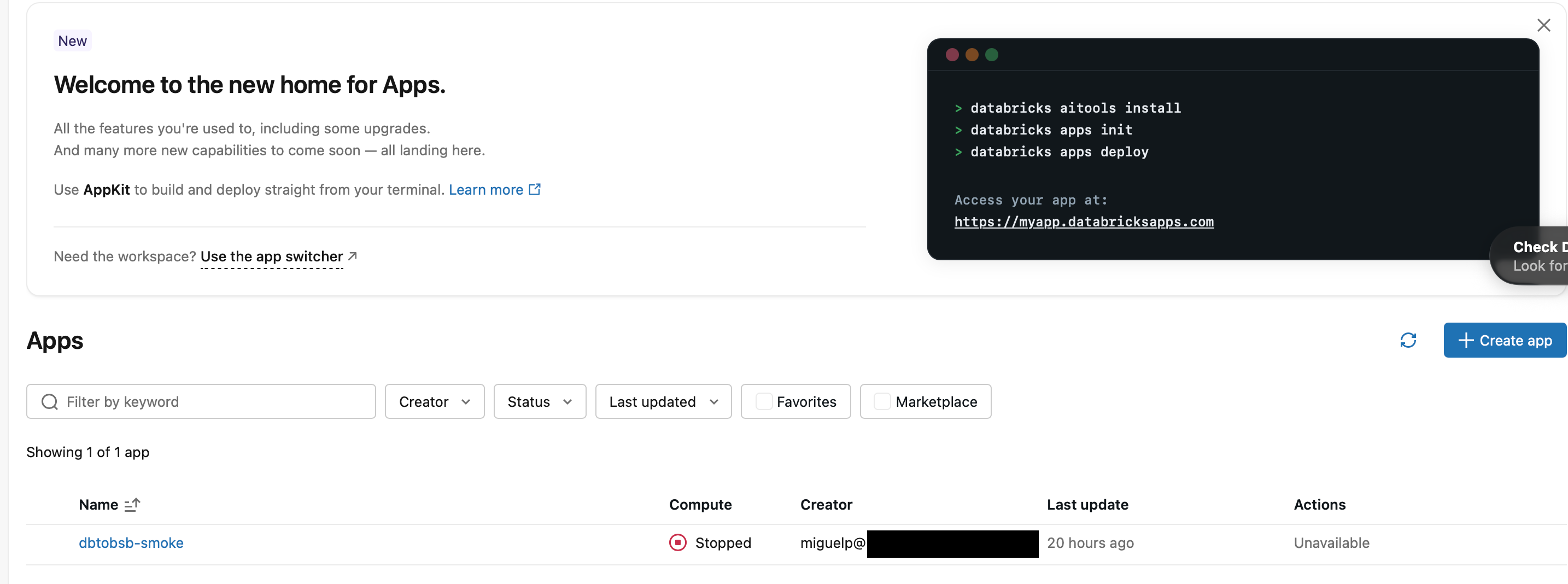
After installation, the App is present in the workspace and its compute is stopped. This is the expected idle state.
3. Resume an interrupted installation
The local .dbtobsb/release-installation-v2.json file records completed stages and
uses owner-only permissions. It also contains sensitive operational identifiers,
including the actor, workspace host, resource IDs, identity and group names, and
schema names. Keep it on the managed installation workstation; do not commit, copy,
or attach it to an ordinary support ticket. Do not edit or delete it after an
interruption.
v0.5.0 has no upgrade or legacy-state adoption path. A v1 state or any prior App, product Job, product object, or Terraform state blocks the fresh installer before mutation.
Run the same command again:
uv run --project installer --no-sync dbtobsb bootstrap
The installer compares the saved stage with remote state and continues safely. It does not repeat a change when the previous result is unknown.
Recover a failed bootstrap
The temporary bootstrap Job emits only an allowlisted static diagnostic. The
installer reads that diagnostic from the selected terminal task, removes the
temporary Job, keeps the last verified local stage, and prints the code without a
native exception, SQL text, identifier, or raw log. Missing, malformed,
conflicting, or unknown task output remains the generic
DBTOBSB_INSTALLER_TEMPORARY_JOB_FAILED code. Do not retry until the matching
condition is resolved:
| Code | Safe next action |
|---|---|
DBTOBSB_BOOTSTRAP_TABLE_CREATE_AUTHORIZATION_FAILED |
Ask the Unity Catalog administrator to verify that the attended actor still owns the selected schema and can create managed tables there. Resume through the same launcher; do not add broad grants. |
DBTOBSB_BOOTSTRAP_TABLE_CREATE_STORAGE_UNAVAILABLE |
Ask the storage and Databricks account administrators to validate read/write access for the managed identity behind the catalog storage root and the serverless network path, including an attached network connectivity configuration, firewall or network-security-perimeter rules, and established private endpoints when those controls are used. Do not run a write test or change storage from the installer workstation. |
DBTOBSB_BOOTSTRAP_TABLE_CREATE_OBJECT_CONFLICT |
Preserve the schema and installer state. Use the attended inventory to resolve the unexpected or partial object; do not delete it by guesswork. |
DBTOBSB_BOOTSTRAP_TABLE_CREATE_PLATFORM_UNSUPPORTED, DBTOBSB_BOOTSTRAP_TABLE_CREATE_SQL_INCOMPATIBLE, DBTOBSB_BOOTSTRAP_TABLE_CREATE_INTERNAL_ERROR |
Keep setup stopped and escalate the static code. This release has no supported local workaround for a platform, DDL-compatibility, or internal-runtime failure. |
The selected SQL warehouse is not the bootstrap compute path. Starting it does not validate or repair storage access for the temporary serverless Job.
Recover a failed App deployment
An App-phase failure is not installation success. The launcher first attempts to
stop App compute and verifies STOPPED. It preserves the last Direct checkpoint,
the nine evidence objects, and the fixed runtime grants.
| Code | Safe next action |
|---|---|
DBTOBSB_INSTALLER_APP_STOP_FAILED |
App compute may still be billable. Run uv run --project installer --no-sync dbtobsb stop from the same checkout and profile. If stopped readback still fails, escalate this code before doing anything else. |
DBTOBSB_INSTALLER_FRESH_APP_REQUIRED, DBTOBSB_INSTALLER_APP_DEPLOYMENT_READBACK_FAILED |
Do not invoke deployment again. Run uv run --project installer --no-sync dbtobsb uninstall --retain, enter RETAIN, and verify the receipt reports the App removed and evidence retained. Use a different existing empty evidence schema for another fresh qualification attempt. |
DBTOBSB_INSTALLER_APP_PERMISSION_FAILED, DBTOBSB_INSTALLER_APP_READBACK_FAILED |
Preserve the stopped App and do not edit its ACL by hand. Run the same retain-uninstall command, then escalate the static code and sanitized ACL category before another fresh attempt. |
Interrupted App-phase stop and retain-uninstall are cleanup paths only. They do not convert the partial state to installed, adopt an existing deployment, or add an upgrade path. Delete-uninstall remains unavailable until installation succeeds.
4. Continue to a first run
The App remains stopped and the reconciler schedule remains paused. Continue with See your first observed dbt run.
If the installer reports a stable code instead of success, preserve that code and
the local state file. Do not edit Jobs, grants, App bindings, or evidence objects by
hand. Project-preparation errors start with DBTOBSB_ONBOARDING_; use the checks in
Prepare a dbt project before running the same bootstrap
command again. For any other code, use the matching table on this page or escalate
the code without attaching raw logs or the state file.